In the last week, I've spent a fair bit of time tidying up the installer. There were a number of issues I had to resolve, such as problems upgrading when the user's admin status had been removed in between the original install and the upgrade … yep, we've had to deal with this.
I also removed a lot of legacy code supporting Windows 95, 98 and Me: the setup installer for Keyman Desktop 7 needed to support these operating systems, as we still supported them when we released version 7.0. It was a nice feeling removing that code!
Much of the work over the last week was under the hood and won't be visible to you as an end user, but I have also made what I think is a significant improvement to the installation user experience.
The installation process for Keyman Desktop 7, while not overly complicated certainly could be daunting to a newbie user. The big reason for this was the large number of dialogs that the user could be presented with during a typical installation. Here's how Keyman Desktop 7 installed for a typical user:
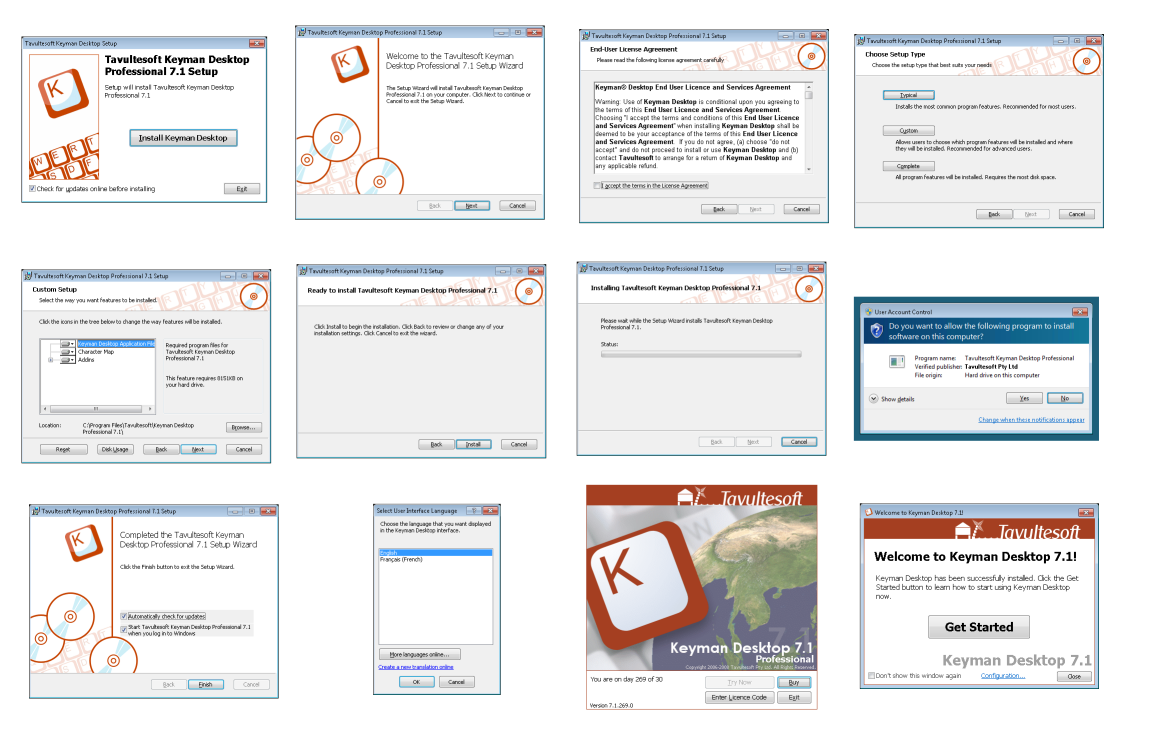 And here's the equivalent in Keyman Desktop 8:
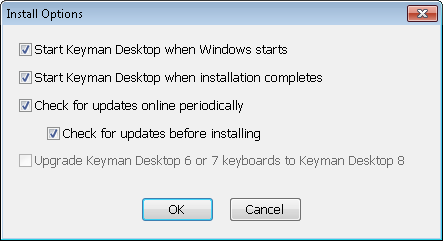
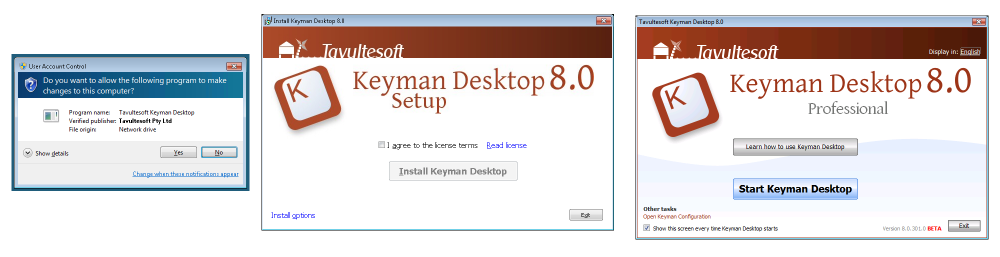 I do feel that's a big improvement. All the Windows Installer dialogs have been hidden, and the install process now consists of checking a single checkbox to agree to the license, then clicking on the Install Keyman Desktop button. I've removed the 'power user' options from the decision sequence and placed them under the "Install Options" dialog:
Similarly, the End User License Agreement (do you read all the EULAs you are presented with?) is now printable and easier to read but less intrusive. The agreement itself hasn't changed!
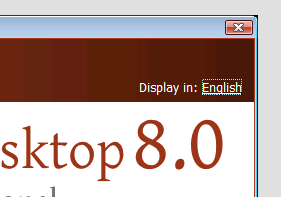
The user interface language choice has been moved to a consistent and common location both in the Welcome screen and the Keyman Configuration screen. This has the advantage of being less easily confused with keyboard layout choice:
Behind the scenes, Keyman Desktop still uses a Windows Installer .msi package to install, so it can be deployed on networks just as simply as before. However, for the typical end user, I'm hoping these modifications will make it much simpler to understand the installation process.
For the technically-minded, here are a handful of the more interesting changes among the 30-odd changes and fixes I've made in the last week:
- When keyboards are included in the installer, they install for all users, not just the installing user
- Welcome screen no longer appears underneath Explorer and other windows after the install completes
- Keyman will be started from the installer as a non-elevated process even though the installer is elevated
- Keyman 6 and Keyman 7 user-installed keyboards will be transferred correctly for the user who launches the installer, even if they have to elevate to another admin user account
- Keyman 8 automatically removes the Keyman 7 installation when it runs. You cannot install both Keyman 7 and Keyman 8 on the same computer at the same time.
5 thoughts on “Installing Keyman 8”
Andrew · January 13, 2011 at 11:56 am
A couple of quick questions,
1) when building a keyboard package, is it possible to control the default locale?
2) Is it possible to localise the installation screens (assuming the default language isn’t English)?
Marc Durdin · January 13, 2011 at 1:48 pm
1. It is not currently supported to automatically change the user locale when installing a keyboard package into an existing installation of Keyman Desktop but it would be possible to do this in a standalone installer by specifying a registry key for the desired locale.
2. The install screens can be localised and I hope to publish documentation on this before the release of Keyman 8
Dan Gauthier · January 20, 2011 at 3:15 am
It appears that this new version isn’t working in Trillian? Will it support stuff like that, Windows Live Messenger etc.? It should, right?
Marc Durdin · January 20, 2011 at 5:45 am
Dan, did version 7 work with Trillian? I have not tested Keyman 8 with Trillian but I have with Windows Live Messenger and Skype and no problems there.
Foreign Language Learner · January 24, 2011 at 5:05 pm
I like the language switch function to choose different language fonts. Great job.